
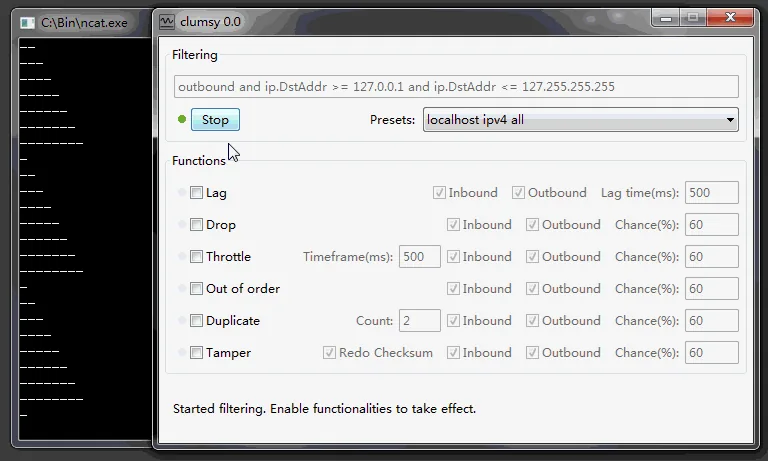
Use github.com/jagt/clumsy for source code and documentation, github.com/jagt/clumsy/releases for published Windows archives and jagt.github.io/clumsy for the project site. The latest official release checked on August 12, 2026 remains 0.3.
01
Which Clumsy GitHub download link should you use?
GitHub exposes different pages for source browsing, release verification, direct downloads and issue tracking.
Open the jagt/clumsy repository when you want the README, source tree, build configuration, commit history, license context or issue tracker. Open GitHub Releases when you want version history and published Windows archives. The project website at jagt.github.io/clumsy explains the utility and links back to downloads. For a Clumsy GitHub download, prefer the official Releases asset over an arbitrary fork or a file copied to another host; the repository owner, tag and asset name are part of the verification record.
A direct GitHub asset URL starts the file download, but it does not show the surrounding release notes. First-time users should review the 0.3 release page before choosing an archive. That page confirms the date, lists all Win32 and Win64 A/B/C assets, and explains why three signature variants exist.
This independent site links to those official destinations. It does not claim to own the Clumsy project, does not replace the repository and does not wrap the archives in a custom installer.
| Destination | Use it for | Verified URL |
|---|---|---|
| Repository | README, source, commits and issues | https://github.com/jagt/clumsy |
| Releases | Version history and official ZIP assets | https://github.com/jagt/clumsy/releases |
| 0.3 release | Current official version notes and files | https://github.com/jagt/clumsy/releases/tag/0.3 |
| Project website | Feature overview and download navigation | https://jagt.github.io/clumsy/ |
02
The latest Clumsy GitHub release is 0.3
The GitHub Release API returned version 0.3 as the latest published release during this update. It was published on October 21, 2023. The notes say the binaries are identical to 0.3 RC4 and mention a higher upper bound for lag, updated IUP and WinDivert dependencies, bandwidth support, RST support, drop-throttled behavior and three WinDivert signature variants.
The repository itself had more recent activity than the release date, but a recent commit does not automatically create a new downloadable version. Users who want a stable published binary should follow Releases. Developers who want unreleased source changes can inspect commits and build instructions, but should not relabel a self-built binary as an official 0.4 or 0.6 release.
The official release list also contains 0.3 RC versions, 0.2 and 0.1. Old versions can matter when reproducing a historical environment, but they should not be recommended as the default download when version 0.3 exists.
03
How to choose a Clumsy GitHub download asset
Choose Win64 when Windows System Information reports an x64-based PC. Choose Win32 for an x86 32-bit installation. For each architecture, the official 0.3 release publishes A, B and C archives. The release notes describe these as binaries using different WinDivert signatures, not as different feature editions.
Start with the A archive unless your authorized environment has a reason to select another official signature. For comparison, this guide records 536,789 bytes and SHA-256 F50DC734148815831C67D9FC2C246C22D421C53DCEA51E26EEE905B0B2806C27 for Win64 A, plus 581,772 bytes and SHA-256 57B880F65E8A628A84749DF09358235676E361F576FC263F00F4F275C1A4EA51 for Win32 A. Direct asset HTTP responses could not be confirmed in this environment; download from the official release page and calculate the hash locally.
After download, extract the complete ZIP. Keep its files together because the executable depends on the accompanying packet-diversion components. If a security product blocks the file, review the exact detection, source and checksum. Do not disable protection simply because a random tutorial says to do so.
| Asset | Bytes | SHA-256 |
|---|---|---|
| clumsy-0.3-win64-a.zip | 536,789 | F50DC734148815831C67D9FC2C246C22D421C53DCEA51E26EEE905B0B2806C27 |
| clumsy-0.3-win32-a.zip | 581,772 | 57B880F65E8A628A84749DF09358235676E361F576FC263F00F4F275C1A4EA51 |
04
What the Clumsy source code tells you
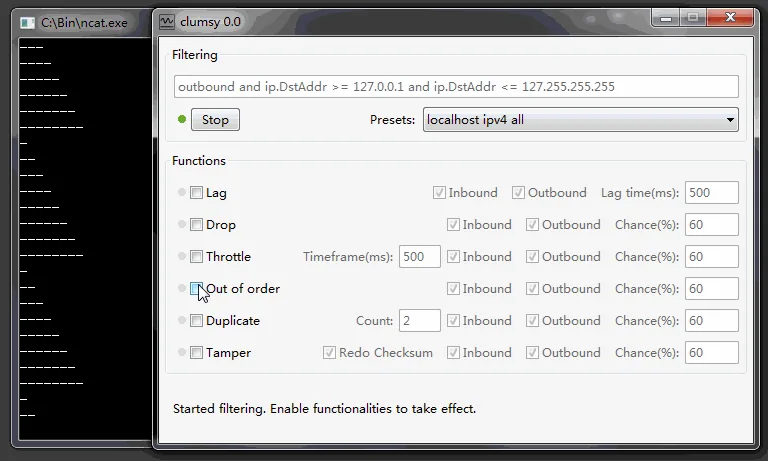
The README describes Clumsy as a managed, interactive way to make Windows network conditions worse for testing. It highlights no installation, no proxy setup, system-wide packet capture, local-to-local support and the ability to start or stop impairment while an application remains open. Those statements define the product more accurately than third-party pages that market it only as a lag switch.
The source tree and build configuration are useful for technical review. They show that Clumsy uses WinDivert for packet interception and that the project includes modules for lag, drop, throttle, duplicate, out-of-order and tamper behavior. A source review can help an organization understand why security software monitors the application and whether its use fits internal policy.
GitHub issues provide valuable troubleshooting context but are community discussions, not guaranteed support instructions. Treat issue comments as leads to investigate. Confirm the operating system, architecture, Clumsy build and WinDivert behavior in your own environment before adopting a workaround.
05
Verify that a Clumsy download really came from GitHub
Check the browser address before downloading. The release page should be under github.com/jagt/clumsy, and a direct asset should resolve from a GitHub release-download URL associated with tag 0.3. A page can copy the filename and still serve a different archive, so the displayed name alone is not sufficient.
Compare the archive's exact byte size and calculate SHA-256 with a local tool such as PowerShell Get-FileHash. A checksum mismatch means the file is not byte-for-byte identical to the asset verified for this guide. Delete an unexplained mismatch and return to the official release page rather than trying to run it.
Finally, inspect the extracted folder before execution. An official portable archive should not need a third-party installer, browser extension, download manager or account sign-in. Unexpected executables, advertising wrappers or requests to disable security protections are reasons to stop.
- Confirm the repository ownerThe official project path is jagt/clumsy.
- Confirm the release tagThe current published release is tag 0.3.
- Confirm the assetMatch architecture, filename and exact byte size.
- Calculate SHA-256Compare the complete checksum, not only the first few characters.
- Extract without a wrapperThe official archive is portable and does not require a custom installer.
06
Forks, keybind builds and unofficial Clumsy versions
GitHub can host forks and modified Clumsy builds from other owners. A fork is not automatically malicious, but it is not the same trust boundary as jagt/clumsy. Review who maintains it, what commits differ, whether source matches the binary and whether the change is documented. Keybind editions and game-oriented repackages may alter behavior in ways that the official project does not support.
Version labels such as 0.4, 0.4 v2 and 0.6 appear in search queries and third-party pages, but none is present in the official release list checked here. Do not infer authenticity from a higher number, popular video or forum recommendation. The dedicated official versus unofficial version guide explains how to evaluate those claims.
For ordinary development and QA work, the published 0.3 release is the clearest baseline because its source, release notes and assets share one official repository.
A GitHub URL is not enough. Confirm the owner is jagt and the repository is clumsy before treating the page as the official project.
FAQ
Clumsy GitHub FAQ
What is the official Clumsy GitHub repository?
The official repository is github.com/jagt/clumsy.
Where are official Clumsy downloads on GitHub?
Use the repository's Releases section. Version 0.3 provides Win32 and Win64 A, B and C ZIP archives.
Is the main branch the same as the latest release?
Not necessarily. Commits can occur after a published release. Use GitHub Releases for the current published binary and the source tree for development history.
Are all GitHub Clumsy forks official?
No. GitHub forks belong to their respective maintainers. Review the owner, source differences and binary provenance before using a fork.
Does the official project have Clumsy 0.4 or 0.6?
No matching tag appears in the official release list checked on August 12, 2026. Third-party builds using those labels should be treated as unofficial until their provenance is independently verified.
Where is the official Clumsy GitHub download?
Open the Releases section of github.com/jagt/clumsy and choose the 0.3 Win32 or Win64 A/B/C archive. The repository page is for source and documentation; the release page is the correct place to verify a published download asset.