
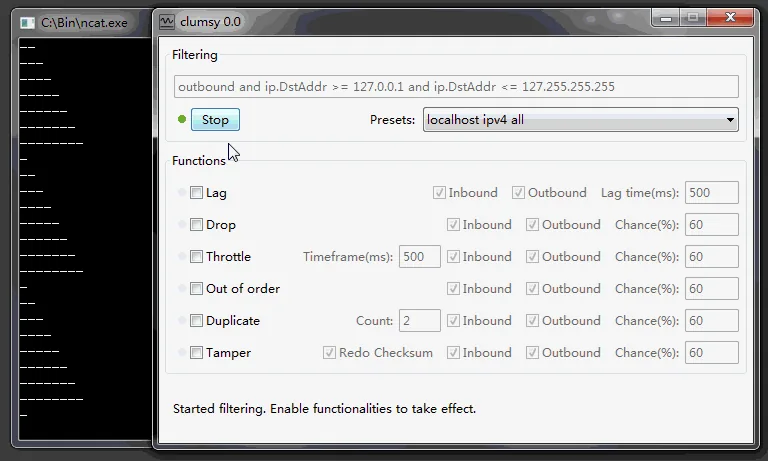
The official Clumsy 0.3 download is a portable ZIP, not an installer. Most Windows 10/11 x64 systems should start with clumsy-0.3-win64-a.zip, verify the SHA-256 value, extract the complete archive and test only in an authorized environment.
01
Clumsy 0.3 download: release facts
Version 0.3 is the latest official entry in the jagt/clumsy GitHub Release list. It was published on October 21, 2023, ten years after the project's 0.1 release. The release notes state that the 0.3 binaries are identical to 0.3 RC4, which had already been available for approximately a year and a half. For a Clumsy 0.3 download, use the official 0.3 release tag and verify the exact asset name; a repository commit or third-party 0.4 label is not a published official release.
The application remains a portable Windows utility. There is no official MSI or setup wizard in this release. Download the appropriate ZIP, extract all files and run Clumsy from the extracted folder. The official README describes no-install operation and system-wide network capture through WinDivert.
A newer repository commit is not the same thing as a newer published release. If you build the current source yourself, record the commit and toolchain instead of presenting it as an official 0.4 or 0.6 binary.
| Fact | Verified value | Source |
|---|---|---|
| Latest release | 0.3 | Official GitHub Releases API |
| Published | October 21, 2023 | 0.3 release metadata |
| Documented Windows | 7, 8 and 10 | Official README |
| License | MIT | Official README |
| Install method | Extract portable ZIP | Official README and assets |
02
Choose the correct Clumsy 0.3 download
Use the Win64 archive when Windows System Information reports an x64-based PC. That is the normal choice for most current Windows 10 installations. Use Win32 when the System Type is x86. The architecture label refers to the executable and supporting packet-diversion files, not to the network application you plan to test.
Each architecture has A, B and C variants. The release notes say these use different WinDivert signatures. They are not Basic, Pro or feature tiers. Begin with A. If an authorized test computer's security controls block that signature, read the official release context and security event before considering B or C.
Do not download all six files simply because they exist. Choose one architecture and one signature variant, verify it, and keep that exact archive with the test record. That makes later reproduction and security review much easier.
03
Clumsy 0.3 file sizes and SHA-256 checksums
The official GitHub release page and API list the two A archives. This page records the file sizes and SHA-256 comparison values used in the guide, but it does not host the ZIPs or claim that a live direct-download HTTP response was verified here. Download the archive from GitHub and compare the complete digest; the abbreviated checksum beside homepage buttons is only a preview.
In PowerShell, Get-FileHash with the SHA256 algorithm can calculate the digest. A different hash means the archive is not byte-for-byte identical to the official asset checked here. Confirm that you selected the same architecture and A variant before treating a mismatch as suspicious.
| Official archive | Exact bytes | SHA-256 |
|---|---|---|
| clumsy-0.3-win64-a.zip | 536,789 | F50DC734148815831C67D9FC2C246C22D421C53DCEA51E26EEE905B0B2806C27 |
| clumsy-0.3-win32-a.zip | 581,772 | 57B880F65E8A628A84749DF09358235676E361F576FC263F00F4F275C1A4EA51 |
A mirror can reuse an official-looking filename. Match the repository owner, release tag, exact bytes and full SHA-256.
04
What changed in Clumsy 0.3
The release raises the upper bound for lag to 15 seconds, switches the shipping build to Zig 0.9.0, updates IUP and WinDivert dependencies, and provides three binaries with different WinDivert signatures. It also credits community contributions for bandwidth functionality, adds RST support, introduces drop-throttled behavior for burst packet loss, and improves chance precision.
These changes make 0.3 a meaningful upgrade from older official releases, but the project still presents Clumsy as an interactive desktop testing utility rather than a background network policy product. Use it for controlled test windows, not as a permanent traffic manager.
Because 0.3 and 0.3 RC4 binaries are described as identical, users on RC4 can review the final release notes and move to the stable tag for clearer provenance. Users on 0.2 should prefer 0.3 unless a historical compatibility test specifically requires the old release.
- Lag upper bound increased to 15 seconds.
- Official Win32 and Win64 builds now include three WinDivert signature variants.
- IUP and WinDivert dependencies were updated.
- Bandwidth, RST and drop-throttled support are included.
- Chance handling is described as more accurate.
05
Install and start Clumsy 0.3
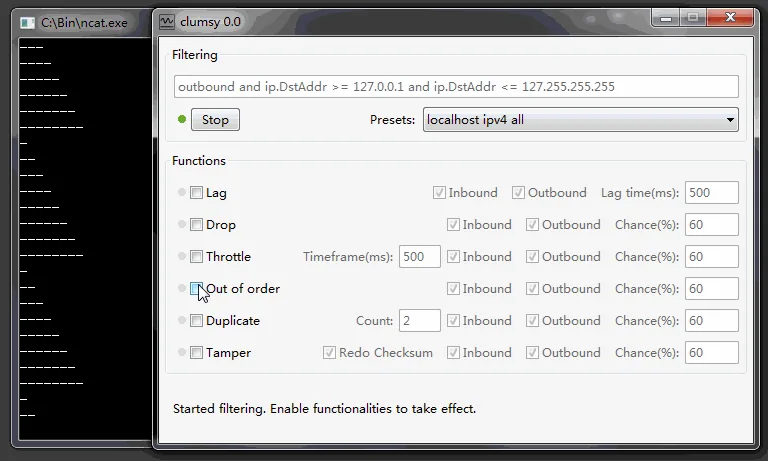
Clumsy does not use a traditional installer. Save the official ZIP, verify it, extract the complete archive to a folder and keep its files together. Launch the executable only after you have closed or saved work that depends on a stable connection. Windows may request permission because WinDivert interacts with network packets at a low level.
Begin with a narrow filter and one impairment. The complete Clumsy usage guide walks through preparation, a first lag test, a packet-loss test, advanced modules and recovery. Always select Stop and confirm normal behavior before ending the session.
If the application is blocked, do not download a random ‘fixed’ executable. Confirm architecture, complete extraction, official checksum and the exact security event. Corporate device policy may require an administrator to approve or reject the tool.
- DownloadChoose one official architecture and signature archive.
- VerifyCompare source, file size and SHA-256.
- ExtractUnzip the entire archive to a normal folder.
- PrepareClose nonessential network activity and define the test.
- RunUse a narrow filter, one impairment and an explicit recovery check.
06
Older and unofficial version labels
The official release history includes 0.2, 0.2 RC1 and 0.1 as well as 0.3 release candidates. Those tags are useful for historical reproduction, but they are not the recommended default for a new test environment.
Search results also mention Clumsy 0.4, 0.4 v2 and 0.6. None appears as an official jagt/clumsy release in the source checked for this page. They may be modifications, repackages or unrelated community labels. This site does not provide direct downloads for them.
If a modified build is required for a legitimate reason, document its repository owner, commit, build process, changes, binary checksum and reviewer. A higher version number without those facts is weaker evidence than the published 0.3 release.
FAQ
Clumsy 0.3 download FAQ
Is Clumsy 0.3 the latest official release?
Yes. Version 0.3 is the latest entry in the official jagt/clumsy Release list checked August 12, 2026.
Is Clumsy 0.3 the same as 0.3 RC4?
The final 0.3 release notes state that its binaries are identical to 0.3 RC4. The stable tag provides clearer final-release provenance.
Which Clumsy 0.3 file should I download?
Most users should choose clumsy-0.3-win64-a.zip. Choose Win32 only for an x86 32-bit Windows installation.
What do A, B and C mean?
The official release says they use different WinDivert signatures. They are not different feature editions.
Does Clumsy 0.3 require installation?
No. It is a portable ZIP. Extract all files and run the executable from the extracted folder.
Is there an official Clumsy 0.4 or 0.6?
No matching release appears in the official jagt/clumsy history checked for this update. Treat files using those labels as unofficial until independently verified.
Where is the official Clumsy 0.3 download?
Open the official jagt/clumsy 0.3 GitHub Release and choose the Win64 or Win32 asset there. This page lists the A-file details for comparison but does not serve the ZIP itself. After downloading, compare the filename, size and complete SHA-256 value.