
Use a network emulator when you need a real Windows application to keep using its normal network stack while selected packets are impaired. Start with one narrow filter, one condition and one measured workflow; record the baseline, run the test, select Stop and prove that normal behavior returns.
01
What is a network emulator?
A network emulator sits in the path of real traffic and deliberately changes selected packet behavior. The application still opens real sockets, resolves real names and talks to the intended service, but the test layer can delay, drop, throttle, duplicate, reorder or modify matching packets. This makes emulation useful for observing loading states, retries, reconnects, timeout boundaries, progress indicators and recovery behavior in the product users actually run.
The important word is selected. A useful network emulation test does not make the whole computer randomly unreliable. It defines a target, direction and condition that correspond to one question. For example, a team may add 300 ms of delay to one authorized API endpoint and check whether a form preserves user input while the request is pending. Another test may drop a small percentage of matching packets and inspect whether a reconnect avoids duplicate operations.
A network emulator is not a speed-test service and it is not proof that an application will behave identically on every mobile or wide-area network. Real connections combine changing latency, jitter, loss, congestion, handoffs, DNS and server effects. Emulation gives a controlled condition that can be repeated; it becomes useful evidence only when the configuration, baseline and observed result are recorded.
02
Network emulation vs network simulation
The terms overlap in casual writing, but they usually answer different testing questions.
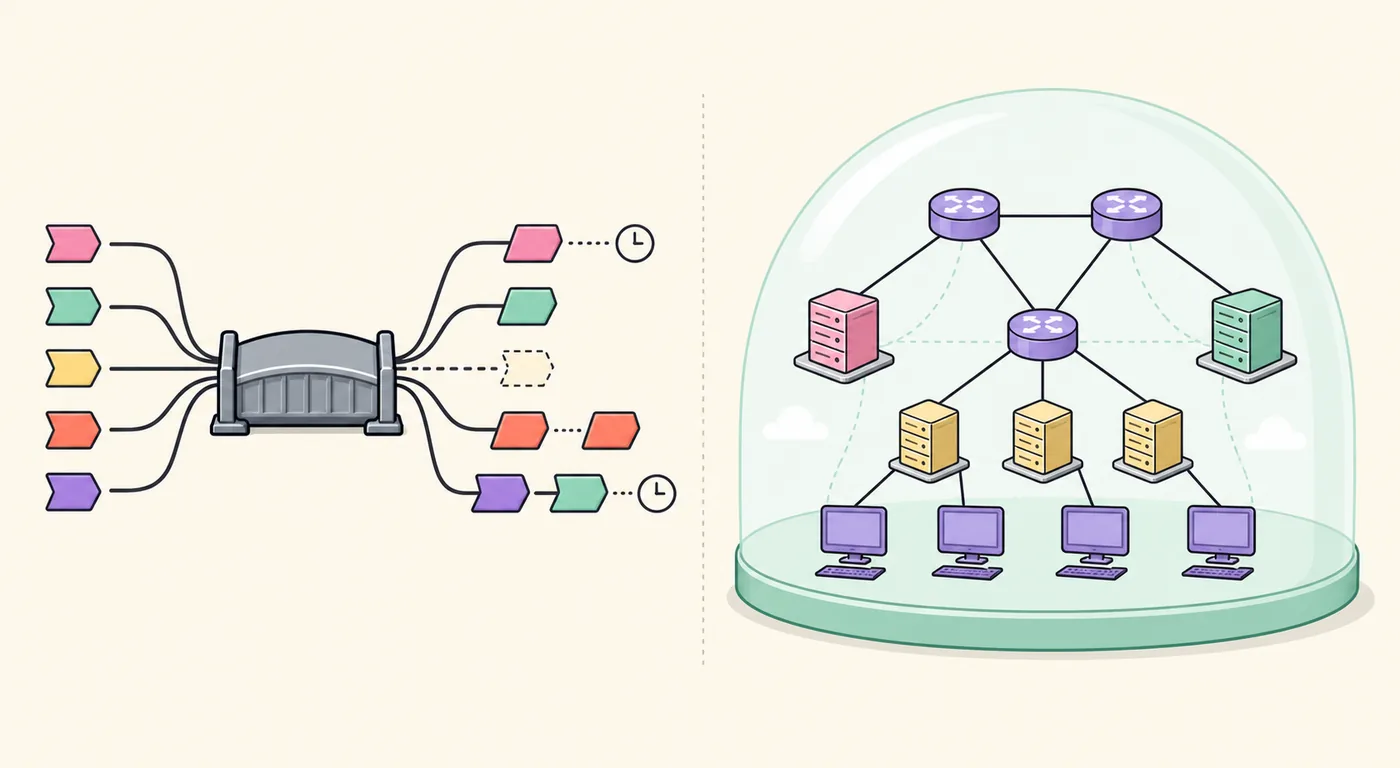
Network emulation changes the traffic of real applications or devices. Network simulation models a topology, protocol or event sequence inside a virtual environment. Choose emulation when the question is ‘How does this build behave when its real requests are delayed or lost?’ Choose simulation when the question is ‘How could this network design or routing model behave before the real environment exists?’
The distinction also prevents a common keyword mismatch. People searching for a router lab, certification topology or large virtual network may need GNS3, EVE-NG, ns-3 or another simulation platform, not Clumsy. People testing a Windows desktop app, browser workflow or local client under poor network conditions need an emulator or impairment tool. Clumsy belongs to the second group.
This editorial illustration is a conceptual comparison, not a screenshot of Clumsy or another product. The left side represents real packets crossing an impairment bridge; the right side represents an entirely modeled topology.
| Method | Uses real application traffic | Best question | Typical scope |
|---|---|---|---|
| Network emulation | Yes | How does the actual app handle a controlled bad condition? | One app, endpoint, device or test path |
| Network simulation | Usually no | How does a modeled topology or protocol behave? | Virtual routers, links, nodes and events |
| Browser throttling | Browser traffic only | How does this web page load under a preset? | One browser tab or developer session |
| Proxy shaping | Traffic routed through the proxy | How does HTTP/API traffic behave under policy? | Configured clients and protocols |
03
How Clumsy works as a Windows network emulator
Clumsy is a portable Windows utility built around WinDivert. Its packet filter decides which traffic enters the impairment pipeline, and its modules decide what happens to that traffic. Lag holds packets before reinjection. Drop prevents a percentage from continuing. Throttle limits sustained transfer behavior. Duplicate repeats selected packets. Out of order changes delivery sequence. Tamper modifies traffic and belongs in advanced, explicitly authorized robustness work.
Because Clumsy works below a single browser or application, it can affect real desktop software without adding a proxy setting or test-only code path. That is useful, but it also increases responsibility. A broad filter can impair authentication, monitoring, remote access and unrelated tabs. Start with the narrowest expression that satisfies the scenario, keep the Stop control visible and never copy a filter whose scope you do not understand.
Clumsy is interactive rather than a complete automated lab platform. It does not replace application logs, server traces, repeatable test data or CI orchestration. Treat it as the condition generator: your test case still needs a known action, pass criteria, evidence and recovery step. For filter syntax and the full control sequence, use the complete Clumsy usage guide.
| Clumsy module | Condition represented | What to inspect |
|---|---|---|
| Lag | Added delay | Loading feedback, timeout assumptions, cancellation |
| Drop | Packet loss | Retries, reconnects, partial failure, idempotency |
| Throttle | Limited transfer rate | Progress, queues, large uploads and downloads |
| Duplicate | Repeated delivery | Duplicate writes, events and messages |
| Out of order | Changed sequence | Buffering, ordering assumptions and stream recovery |
04
Verified Clumsy version and download choice
This site is a download and documentation site, so version freshness is checked before recommending a new guide. The official GitHub Releases API still identifies 0.3 as the latest published jagt/clumsy release. It was published October 21, 2023 and provides portable Win64 and Win32 ZIP archives in A, B and C signature variants. No official MSI installer is listed.
Most current Windows computers need clumsy-0.3-win64-a.zip. The stable GitHub release URL above was followed to the real release asset and returned HTTP 200, an attachment filename ending in .zip, application/octet-stream content and an exact length of 536,789 bytes. The Win32 A file also returned HTTP 200 with 581,772 bytes. The site links to the stable GitHub release URL rather than saving a temporary signed CDN URL.
A larger unofficial version number does not prove a newer official release. If a file is labeled 0.4, 0.4 v2 or 0.6, check its repository owner, tag history, source, build process and checksum. The official versus unofficial version guide explains that boundary, while the Clumsy 0.3 release page lists verified file facts and checksums.
| Official asset | Use when | Exact size | Download status checked |
|---|---|---|---|
| clumsy-0.3-win64-a.zip | Windows System Type is x64 | 536,789 bytes | HTTP 200 on 2026-07-29 |
| clumsy-0.3-win32-a.zip | Windows System Type is x86 | 581,772 bytes | HTTP 200 on 2026-07-29 |
The download button uses the verified GitHub release URL. GitHub may redirect it to a temporary signed asset address, but the page does not store that expiring CDN URL.
05
Design one repeatable network emulation scenario
Begin with a product question, not an impairment percentage. A useful scenario might say: ‘When the order page receives an added 300 ms delay, the interface should acknowledge the click immediately, preserve the current filters and render one order without duplicate requests.’ That statement identifies the workflow, condition and expected result. ‘Make the network bad’ does not.
Measure the same action before enabling Clumsy. Record approximate response time, visible states, request identifiers and the logs you will compare. Then select one impairment. Combining Lag, Drop and Throttle in the first run makes a failure difficult to explain. Separate runs create evidence that developers can reproduce and fix.
Define the end of the test before it begins. The operator must know who selects Stop, what process should be closed and which baseline action proves recovery. If normal behavior does not return, the environment is not ready for another scenario. Check Clumsy, VPN, proxy, firewall, browser and application state rather than assuming the impairment ended cleanly.
- One authorized application workflow.
- One narrow packet filter and direction.
- One impairment value per run.
- One visible pass or fail condition.
- One mandatory baseline recovery check.
06
Run the Windows network emulator in six steps
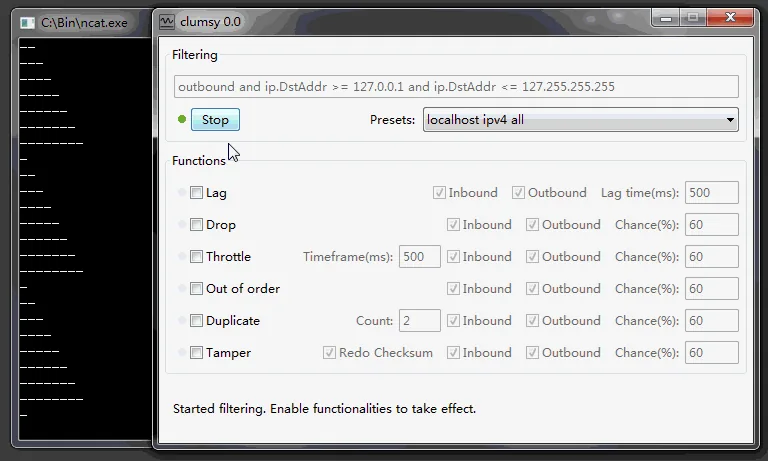
Extract the complete official ZIP and keep the executable with its WinDivert files. Run it only with permission appropriate to the test machine. Enter the narrow filter, confirm the inbound or outbound direction, enable the chosen module and set one documented value. Review every control before selecting Start.
Perform the same action used for the baseline. Observe immediate user feedback as well as eventual completion: loading indicators, disabled duplicate submission, progress, cancellation, retry messages and preserved state. Pair the UI observation with timestamps or logs when possible. Then select Stop and rerun the baseline without impairment.
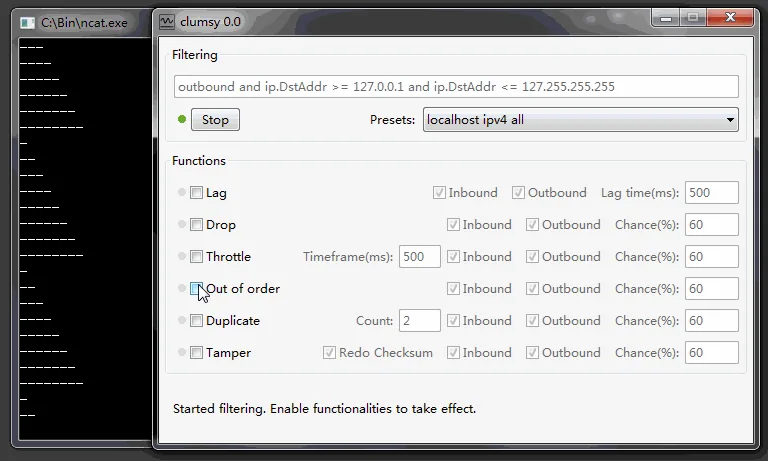
The two official demo frames used on this page show why visual verification matters. A running filter can remain active while a module is being selected. Confirm the state of Start/Stop, the filter field and every checkbox before and after each run.
- DefineWrite one action, impairment and expected result.
- BaselineMeasure the normal workflow and collect reference evidence.
- ScopeChoose the narrowest authorized filter and direction.
- ImpairEnable one Clumsy module with one recorded value.
- ObserveCapture UI behavior, logs, retries and side effects.
- RecoverSelect Stop, close the tool and prove baseline behavior returns.
07
Choose a network emulation test matrix
Use a small progression instead of one extreme profile. For latency, begin with a plausible poor interactive connection and increase only when the product requirement calls for a severe boundary. For loss, start low and watch retries, reconnects and server-side effects. For throughput, use a representative transfer and inspect whether the interface communicates progress rather than appearing frozen.
Duplicate and out-of-order tests are especially important for messaging, streaming and write operations. A repeated response must not create repeated orders or records. A reordered stream must not silently corrupt state. These scenarios need server evidence as well as a visible client result; Clumsy can produce the condition, but it cannot prove correctness by itself.
Keep the matrix tied to focused guides. The latency simulator guide, packet loss testing guide and network jitter guide provide narrower recipes and recovery checks.
| First condition | Example starting point | Primary evidence |
|---|---|---|
| Latency | 200-300 ms added delay | Immediate feedback, timers, preserved state |
| Packet loss | Low percentage on one target | Retries, reconnects, duplicate-side-effect checks |
| Throttle | One limited transfer | Progress, queue behavior, cancellation |
| Duplicate | Low chance or controlled count | Idempotency and repeated event handling |
| Out of order | Narrow stream scenario | Ordering, buffering and recovery logs |
08
Limits, safety and when to choose another tool
Choose another tool when you need a large virtual topology, routing-protocol lab, Linux traffic control, automated cross-platform profiles or cloud-managed distributed impairment. A browser's developer tools may be faster for a single page-load check. A programmable proxy may be better for HTTP-specific rules. A full network simulator is better for modeled routers and links. Tool fit matters more than forcing every network problem into Clumsy.
Do not use network emulation to disrupt third-party services, conceal cheating or interfere with users who did not authorize the test. Run experiments on owned systems or with explicit permission. Keep remote access out of the impairment scope, avoid broad filters on shared machines and stop immediately when the test affects unrelated traffic.
A successful session ends with recovery evidence. Select Stop, close Clumsy, confirm its process ended and repeat the baseline action. Save the application build, Windows version, Clumsy version, archive source, checksum, filter, module values, observed result and recovery confirmation together. That record turns a temporary bad connection into a reproducible QA finding.
Clumsy creates the condition. Product assertions still require a documented baseline, application and server evidence, a clear pass condition and a confirmed return to normal.
FAQ
Network emulator FAQ
What is the difference between network emulation and simulation?
Emulation changes real application or device traffic under controlled conditions. Simulation models a virtual topology, protocol or event sequence without requiring the real application path.
Is Clumsy a network emulator or a network simulator?
Clumsy is best described as a Windows network condition emulator or impairment tool. It changes matching real packets; it does not build a virtual router topology.
Can Clumsy emulate latency, loss and bandwidth limits?
Yes. Lag adds delay, Drop introduces loss and Throttle limits transfer behavior. Duplicate and Out of order cover additional delivery conditions. Test one condition at a time before combining them.
What is the latest official Clumsy version?
Version 0.3 remains the latest published release in the official jagt/clumsy GitHub Releases API checked July 29, 2026.
Does the download button use a real ZIP file link?
Yes. It uses the stable official GitHub release asset URL for clumsy-0.3-win64-a.zip. The URL returned HTTP 200 and 536,789 bytes during the freshness check.
Can a network emulator reproduce every real mobile network?
No. It can reproduce controlled conditions, but real mobile networks also change due to radio quality, congestion, jitter, handoffs, DNS, routing and server behavior. Use emulation as one repeatable part of broader testing.