
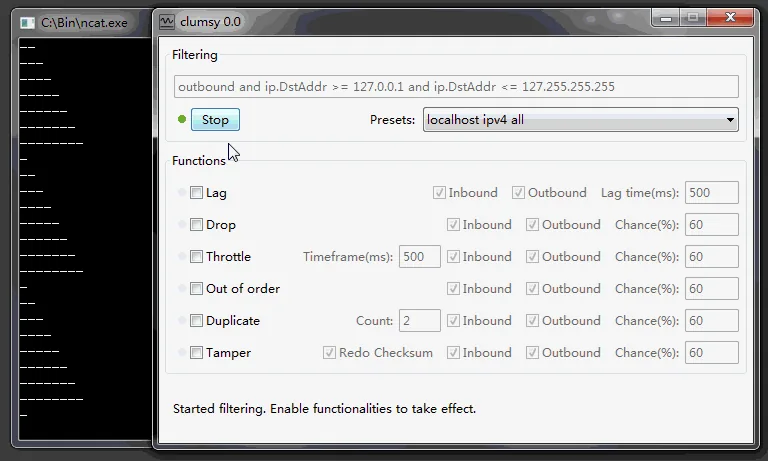
Measure a normal stream first, choose one authorized target, enable only the Out of order condition, record the exact filter and values, then inspect sequence gaps, buffering, retries and final state. Stop Clumsy and repeat the same action before treating the test as complete.
01
What out-of-order delivery means
The test is about arrival order, not simply making a connection slow.
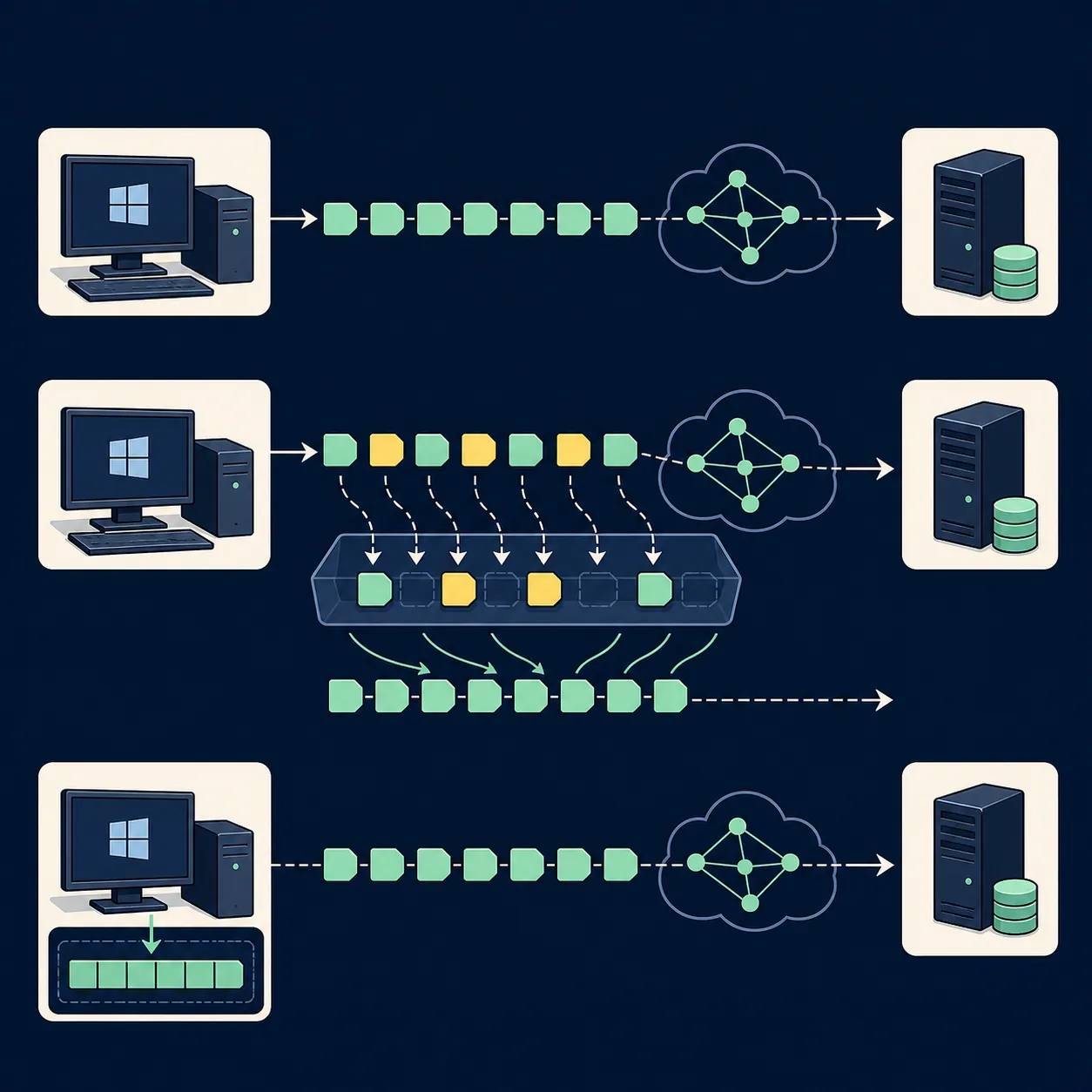
A sender can emit packets in sequence while the receiver sees a later packet first. The application, transport layer or protocol library may then hold data in a buffer, request a retransmission, discard a stale fragment or deliver a partial result. The useful question is not whether the screen looks worse; it is whether the software preserves state and reconstructs the intended message when delivery order changes.
Out-of-order delivery is different from packet loss. With loss, a packet never arrives and the system must detect a gap or wait for a timeout. With reordering, the packet may arrive later. It is also different from latency: a uniform delay moves traffic later without necessarily changing its order. Keep those conditions separate during the first run so a bug report has one plausible cause.
Clumsy works on matching Windows traffic selected by a filter. The official 0.3 project includes an Out of order module alongside Lag, Drop, Throttle, Duplicate and Tamper. The exact product behavior still depends on the filter, direction, protocol, packet sizes and application under test, so record the actual configuration instead of claiming that every protocol will react in the same way.
| Condition | What changes | Evidence to inspect |
|---|---|---|
| Out of order | Later matching packets can arrive before earlier ones | Sequence gaps, buffering, reassembly and final state |
| Packet loss | Some matching packets are discarded | Retries, timeouts, reconnects and duplicate side effects |
| Latency | Matching packets wait before delivery | Loading feedback, timers and cancellation |
| Duplicate | A selected packet may be delivered more than once | Idempotency, repeated events and duplicate writes |
02
Design a safe packet-reorder test
Start with one known workflow: a streaming response, a paginated API, a message consumer or a file transfer that can be repeated without damaging real data. Write the expected result before opening Clumsy. For example, a client should buffer a reordered response, preserve the request identifier and render one complete result rather than showing stale or duplicated content.
Measure the same workflow without impairment. Capture the approximate completion time, visible state changes, client logs, server logs and any sequence or request identifiers that the system already exposes. A clean baseline makes it possible to distinguish an ordering defect from a normal slow response or a pre-existing connection problem.
Use the narrowest filter that covers the authorized test target. Avoid a rule that also touches authentication, remote access, monitoring, unrelated browser tabs or the tool you need to observe the run. Keep Drop, Lag, Throttle, Duplicate and Tamper disabled until the single-condition result is understood.
- One repeatable workflow and one authorized target.
- A baseline run with client and server evidence.
- One narrow filter whose scope you can explain.
- One Out of order condition per run.
- A written recovery check before pressing Start.
03
Run the Clumsy out-of-order test
Use the official Clumsy 0.3 Release page as the source. The current official release metadata checked on August 22, 2026 still identifies 0.3, published October 21, 2023. Download the appropriate ZIP, extract the complete archive and keep the filename and source page with the test record. This page does not host a repackaged executable.
Open Clumsy with the permissions approved for the test computer, enter the documented filter and enable only Out of order. Do not copy a broad filter from a forum post when you cannot predict its scope. Record the direction, protocol, host or port boundary and every value shown in the interface before selecting Start.
Perform the same action used for the baseline. Watch the application and logs for a sequence gap, a temporary buffer, a delayed completion, a retransmission or a state transition that never resolves. If the first run is noisy, stop, narrow the target and repeat it as a separate run rather than changing several settings while the condition is active.
- BaselineRun the workflow normally and save the expected result and timing.
- ScopeSet the narrowest filter and record protocol, direction and target.
- IsolateEnable Out of order only; leave other impairment modules off.
- ObserveCompare client state, sequence evidence, buffers, retries and server records.
- RecoverSelect Stop, repeat the workflow and confirm the baseline returns.
04
What to observe in the client and server
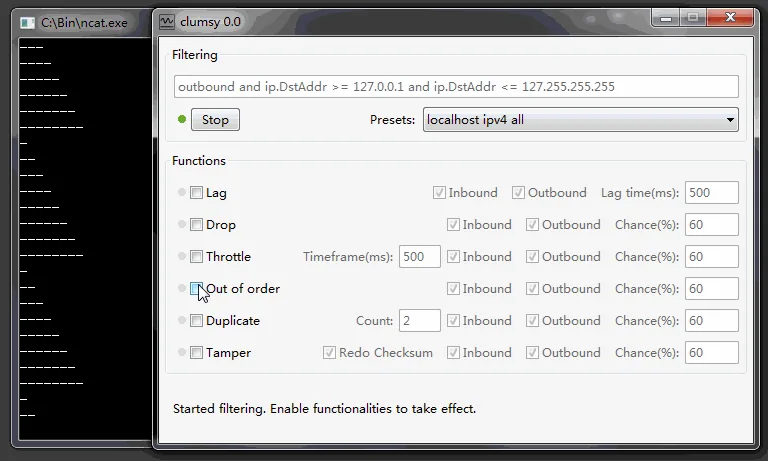
A useful packet reorder test has evidence on both sides of the connection. On the client, look for sequence-aware buffering, a progress state that does not become permanently stuck, one final result, preserved form or navigation state and a clear error when the application cannot recover. On the server, compare request identifiers, response order, acknowledgements, retries and the final write record.
For a stream, check whether later chunks are held until the missing earlier data arrives. For messaging, check whether a later event is applied before its prerequisite and whether the consumer can recover without applying a command twice. For file or API responses, compare the final checksum or parsed object rather than relying on a screenshot that merely looks complete.
Do not confuse a protocol's own reassembly with application correctness. TCP may hide some packet ordering from the application, while UDP-based protocols often expose ordering decisions to the application layer. The exact result depends on the stack. Phrase the finding precisely: for example, ‘the client preserved state when response segments arrived in a different order,’ not ‘the network was fixed.’
The test is incomplete if the application eventually finishes but the computer remains impaired. Stop Clumsy, rerun the baseline and record the recovery result as part of the same test case.
05
Separate reordering from loss, latency and bandwidth
If the product fails under reordering, keep the finding on this page and link the next experiment to the condition that answers a different question. The latency guide is for delayed responses and timeout feedback. The packet loss guide is for retries, reconnects and partial failure. The bandwidth guide is for sustained throughput, progress and cancellation.
Run a small matrix only after the isolated test is understood. Keep the application build, Windows version, Clumsy version, archive source, filter, direction, active module, values, baseline and recovery evidence in every row. Combining reordering with loss or delay can be useful for a realistic scenario, but it should be a new named test rather than an unexplained escalation of the first run.
If the question is how a protocol reassembles out-of-order UDP data, that is a protocol implementation topic rather than a Clumsy download question. The phrase can be useful as a supporting FAQ because it explains why a visible application may or may not expose packet order, but it should not pull this page into a general networking textbook.
| If you need to learn... | Start with... | Primary result |
|---|---|---|
| Whether sequence handling survives reordered delivery | Out of order only | Buffer, ordering and final state |
| Whether retries recover missing data | Drop only | Retry, timeout and reconnect behavior |
| Whether the UI explains a slow response | Lag only | Loading, cancellation and timeout feedback |
| Whether a transfer remains usable at lower throughput | Throttle only | Progress, queueing and completion integrity |
06
Recovery, mistakes and responsible use
Select Stop as soon as the expected observation is complete. Close the test application if it keeps stale state, rerun the baseline action and check any VPN, proxy, firewall or service warnings before repeating the test. If the normal result does not return, do not continue adding impairments; restore the environment and document the difference.
Common mistakes include matching all traffic, enabling several modules at once, changing values mid-run, using production records, treating a screenshot as proof of message integrity and leaving the tool active after the test. A narrow filter, disposable data, repeatable identifiers and a second baseline produce a much more useful engineering record.
Use Clumsy only on your own systems, applications and networks, or where you have explicit permission to test. This guide does not provide anti-cheat bypasses, hidden lag-switch settings, ping manipulation or instructions for disrupting another user or service.
- Stop the condition before leaving the test computer.
- Confirm normal connectivity and application state after Stop.
- Store the exact configuration with the test result.
- Never treat a higher-numbered third-party build as an official update without source evidence.
FAQ
Out-of-order packet testing FAQ
Does Clumsy create true out-of-order packets?
Clumsy can create a controlled out-of-order condition for matching traffic, but the visible result depends on the protocol, direction, filter, operating system and application stack. Record the actual configuration and verify the behavior with logs rather than assuming every application will expose packet order.
Is out-of-order delivery the same as packet loss?
No. Loss means a selected packet is absent; reordering means a packet may arrive later than a subsequent packet. Use Drop and Out of order as separate first experiments so retries and buffering are not mixed together.
Will TCP and UDP show the same result?
Not necessarily. A transport may hide packet-level ordering from the application, while an application-layer UDP protocol may implement its own sequence and reassembly logic. Test the real protocol path used by your product.
Why does the application appear frozen during the test?
It may be waiting for a missing earlier segment, a timeout or an internal buffer limit. Compare the client state with request identifiers and server records, then stop Clumsy and repeat the baseline before deciding whether the behavior is a defect.
Can I use this as a lag switch or ping hack?
No. This page is limited to authorized software and network reliability testing. It does not provide anti-cheat bypasses, concealed lag switching or disruption instructions.